


Three exploits, one week: PHP2Shell and the Elementor Pro upload bug
In the same week, two bugs in PHP itself and one in Elementor Pro, a page builder installed on millions of WordPress sites including two of ours, went from private to public. Each lets an attacker who has never logged in run code on the server. Here is what each one does, what an attack looks like from the server side, and how we closed all three.
Blocked by one network alone within a day of disclosure
Run a PHP version that will never get the fix
Blocked by one firewall vendor since the August patch
How big this is
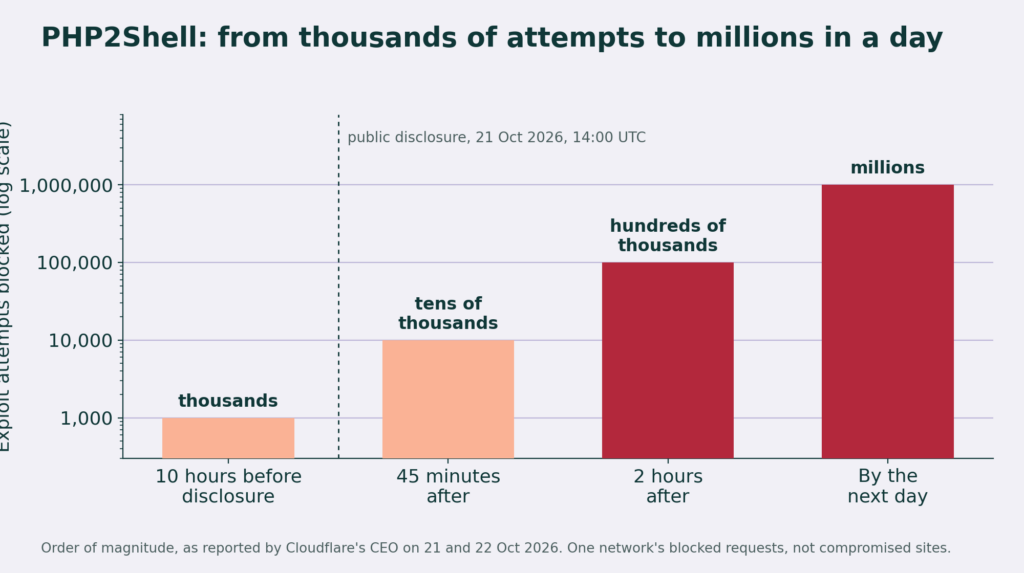
PHP runs about seven in ten websites with a known server-side language, so a bug in PHP is a bug in most of the web. Cloudflare, which fronts a large share of it, had firewall rules for PHP2Shell live about nine hours before the public disclosure on October 21. Its chief executive reported thousands of blocked attempts in those hours, tens of thousands within 45 minutes of disclosure, hundreds of thousands within two hours, and millions by the next day, with attackers reshaping their payloads against the blocks as they went. Amazon's threat team says it saw a first attempt on October 17, four days before a patch existed. Government security offices in Germany, the Netherlands and Japan had not confirmed a successful break-in as of October 22. That is the good news, and it is early.
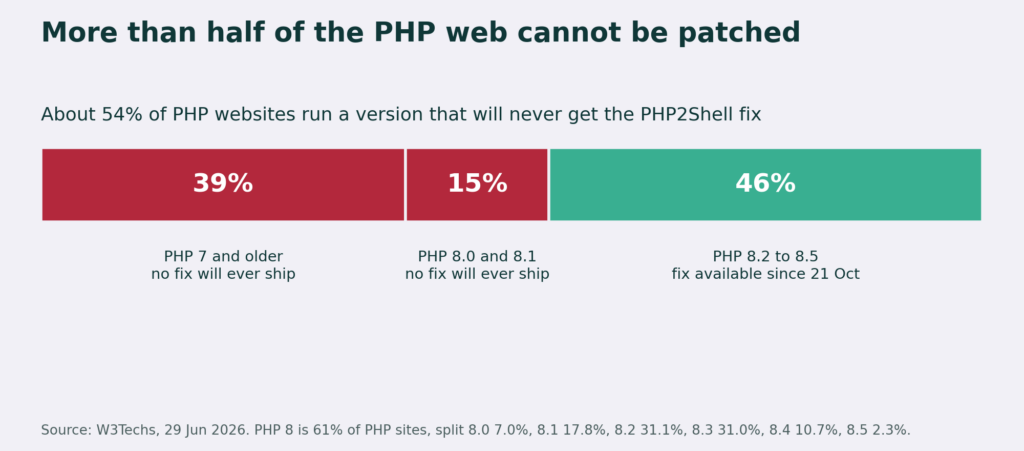
The worse number is the one that does not change with time. The fix exists only for PHP 8.2 and newer. By W3Techs' count, about 39 percent of PHP websites still run PHP 7 or older, and another 15 percent run 8.0 or 8.1. None of those versions is maintained, so for roughly half of the PHP web there is no patch to apply, only a migration to do, or a firewall to hide behind.
The Elementor Pro bug is smaller in reach and older in the wild. Elementor Pro has more than six million installs. Wordfence, one of several WordPress firewall vendors, says it has blocked close to 200,000 attempts against the bug since the August 19 patch, with attacks beginning the same day the fix shipped and peaking that week. Two of our ten sites were still on a vulnerable build two months later. We assume we were not unusual.
Exploit one and two: PHP2Shell
PHP2Shell is the name given to a pair of flaws in the PHP engine, tracked as CVE-2026-109618 and CVE-2026-109619 (CVE means Common Vulnerabilities and Exposures, the public register of security bugs). They live in the code that tracks a file upload while it is still arriving. The first corrupts memory when the server runs out of it mid-upload. The second leaves state from one request lying around for the next one to find. Chain them, and an attacker who can send a large, carefully shaped POST request to any PHP page on the server gets to run their own code there. No plugin has to be installed, no login is needed, and the page they hit does not even have to accept uploads.
Because the bug is in the runtime rather than in any one application, everything on an unpatched server is exposed at once: WordPress, its plugins, anything else written in PHP. The exploit details leaked on October 20. Fixed releases of PHP (8.5.12, 8.4.27, 8.3.36 and 8.2.35) shipped on October 21. PHP 8.1 and older are past end of life and will never get the fix. Attacks were seen in the wild before the patches existed.
Exploit three: the Elementor Pro upload bug
Elementor Pro is the paid half of the most widely installed page builder in WordPress. Its Forms module lets a visitor attach files. CVE-2026-32475 is a flaw in how it checks those files: send an empty file as the first attachment and a PHP file as the second, and the plugin stops validating after the first one. The PHP file lands in the uploads folder, where the web server will happily run it. From a public contact form to a shell on the server in one request. It was patched in version 4.2.2 on August 19 and has been exploited in the wild since.
We did not go looking for this one. We found it because PHP2Shell had us logged into every server anyway, and two of our ten sites were still on an Elementor Pro build older than 4.2.2. Both were patched the same morning, and their upload folders were checked for the PHP files a successful attack leaves behind. There were none.
What an attack looks like in the logs
Each of these leaves a signature a site owner can search for without any special tooling:
- PHP2Shell: POST requests carrying a
PHP_SESSION_UPLOAD_PROGRESSfield, or request bodies far larger than anything the site legitimately accepts (tens of megabytes to a page that takes no uploads). - Elementor Pro: POST requests to the Elementor form handler with more than one attachment, and any file ending in
.phpunderwp-content/uploads/elementor/forms/. That folder should hold only what visitors legitimately attached.
We read the logs we can reach on all ten sites for both. Nothing on any of them.
How we closed all three
Our ten sites run on managed hosting at one provider, across three of its platforms: a virtual private server (VPS) that carries five of them, a shared account with one, and a managed WordPress platform with four. On all three the PHP packages belong to the host, not to us. So the job had three parts: know exactly where we stood, make the host close what only the host can, and close everything else ourselves.
1. Know where you stand, in one pass
The first thing we did was not read the advisory. It was to run one script from our backup hub, which already holds a key to every server, and have it answer two questions per site: which PHP builds are installed, and which build the site is actually serving. Those are different questions. A host can drop new packages on a server while the old PHP process keeps running the old code for hours, and a version check that only looks at the package will call that server safe.
# one pass over every server, from the backup hub
for each server:
    installed = php -r "echo PHP_VERSION;"   for each /usr/local/php8*/bin/php
    build date = stat of the php binary
    running   = the php-fpm pool the site's process list shows
    started   = when that php-fpm master last restarted
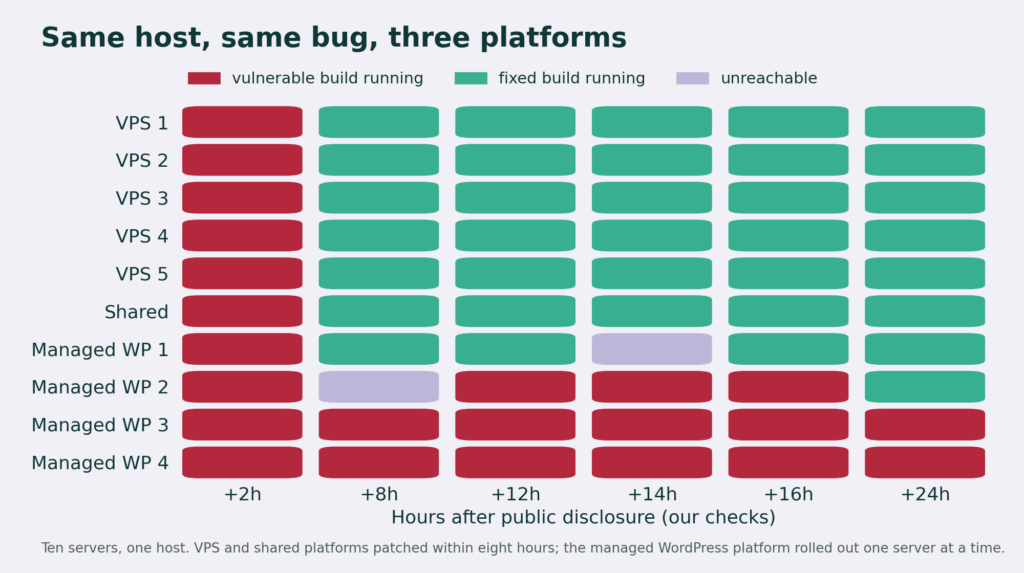
The whole fleet answers in about a minute. At two hours after disclosure the answer was ten servers, ten vulnerable, all on builds from June or early October.
2. Find out whether anyone got in first
Before touching anything we read the day's access logs on all ten sites for the two things a PHP2Shell attempt leaves behind: a POST carrying a PHP_SESSION_UPLOAD_PROGRESS field, and request bodies in the tens of megabytes aimed at pages that take no uploads. Nothing on any site. That mattered for what came next: it meant we were racing the patch, not cleaning up after a breach, and it told the host the same thing in writing.
3. Give the host a ticket it can act on
A ticket that says "please patch PHP" goes to the back of a very long queue on a day like that. Ours listed each server by its hostname and account, the exact build each one reported, which platform it was on, and three specific asks: a timeline for the patch, a restart of the PHP process on each server after the update, and whether a per-site setting (turning off upload progress tracking) would blunt the bug on their platform in the meantime. The host replied within four hours: a firewall rule against the known exploit attempts was already live on every platform, and a rolling update was under way. That rule is the reason the first chart in this article is not scarier than it is.
4. Verify, do not trust
Then we ran the same script every few hours and kept a log. A server was ticked off only when its running process, not just its package, was on the fixed build. That rule caught two things a glance would have missed. At eight hours one managed WordPress server was unreachable in the middle of its update. At fourteen hours another dropped offline for three minutes and, when it came back, reported the old June build again; on the next pass it was patched, with a fresh process start time. Without the repeat check we would have recorded it as done on the first green and never looked again.
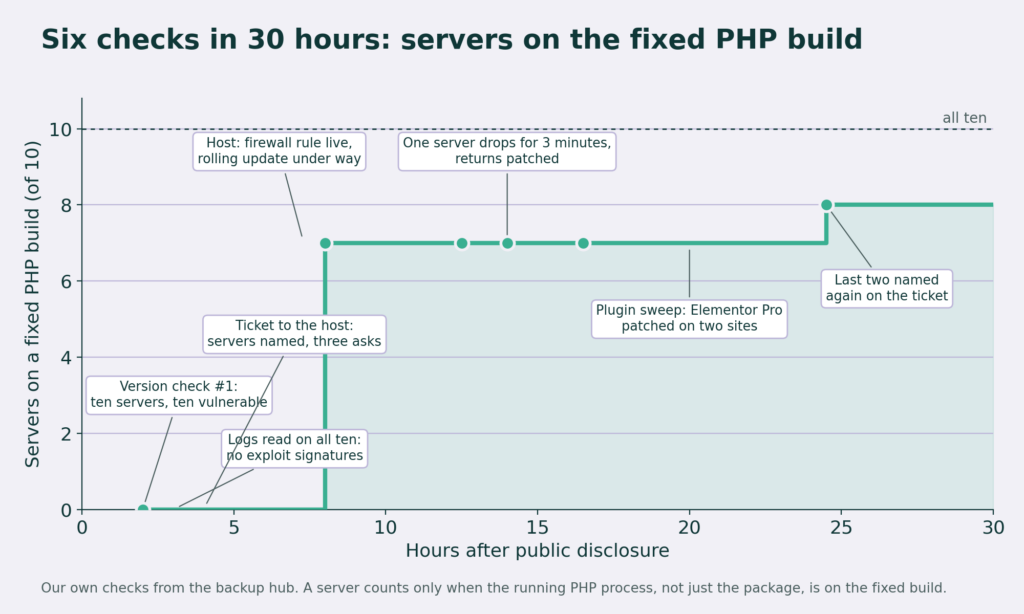
The pattern by platform was the real lesson. The VPS and the shared server were patched within eight hours of disclosure. The managed WordPress platform, which markets itself on taking updates off your hands, was the slowest: one server at a time, over the following days, and the one with the oldest build was the last. If your host runs more than one platform, the one your site is on decides how long you are exposed, and nobody will tell you that unless you check.
5. Close what the host cannot
Two gaps were ours to close. The first came from being on every server anyway: while the version script ran, we also listed every active plugin and its version. Two sites were on an Elementor Pro build older than 4.2.2, the one with the upload bug. On one of them the normal update failed because the plugin's license check refused the download, so we took the licensed, already updated copy from our hub site and put it in place by hand, then checked the forms upload folder on both for the PHP files a successful attack leaves. Ten minutes per site, nothing found.
The second gap no vendor will ever close. One of the managed WordPress servers still runs a PHP 8.1 process alongside the current one. PHP 8.1 is past end of life, so even after the host's update lands on that server, that process stays vulnerable until the site is moved to 8.3. That is a change we make, and it is scheduled.
What stays changed
The version check becomes a nightly job on the backup hub, so the next time a runtime bug drops, the first question (which servers are exposed?) is already answered before we have read the advisory. And every site we run is going behind a web application firewall, because for about a day the host's rule was the only thing between an unpatched server and the open internet, and we would rather have two layers than one.
If you run a WordPress site, three things to do today.
1. Find out which PHP version your site is serving. In WordPress, Tools, Site Health, Info, Server shows it. Anything below 8.2.35, 8.3.36, 8.4.27 or 8.5.12 is exposed, and 8.1 or older cannot be fixed.
2. Ask your host, in writing, when they patched and whether PHP was restarted afterward. A patched package with the old process still running protects nothing.
3. Put a web application firewall in front of the site if there is not one already. It will not fix the bug, but it buys the time a patch needs.
We do this for other people's sites too.
Everything in this article is a service Awen provides for WordPress sites, whether we built them or not. A security review covers the same ground we covered on our own ten: which PHP build your server is actually serving, every plugin and theme checked against the known-vulnerable lists, your logs searched for the signatures of the exploits that are circulating, and a written report of what we found and what it means. If something is open, we close it: we patch what can be patched, including plugins whose updates fail or whose licenses have lapsed, put a web application firewall in front of the site, and move it off any PHP version that will never see another fix. After that our monitor checks the site every night and tells us when something changes, so the next PHP2Shell is a notification, not a scramble.